




Hooray, friends! My long-awaited ASUS ProArt RTX 5090 is finally here!
Well, technically, it arrived on Friday. But installing it alongside my good old(!) RTX 4090 turned into quite an adventure.
First, I discovered that my power supply had only three free 8-pin connectors, while the GPU adapter required four. So I had to order a special Corsair cable that powers the card using just two connectors instead.
That cost me another day.
Finally, I assembled everything, pressed the power button, and…
Absolutely NOTHING worked.
After several hours of troubleshooting, a lot of swearing, and roughly half a pack of calming pills, I finally discovered the culprit: while cleaning dust before the installation, I’d accidentally loosened a RAM stick and hadn’t pushed it all the way back in.
Problem solved! I turned the computer on and…
…waited for the motherboard to retrain the memory.
Restarted again and…
…waited for Windows to inexplicably check the system drive.
Restarted one more time and…
IT WORKED!!!
Now I have both the RTX 5090 and RTX 4090 running in my main workstation!
Time for some benchmarks!
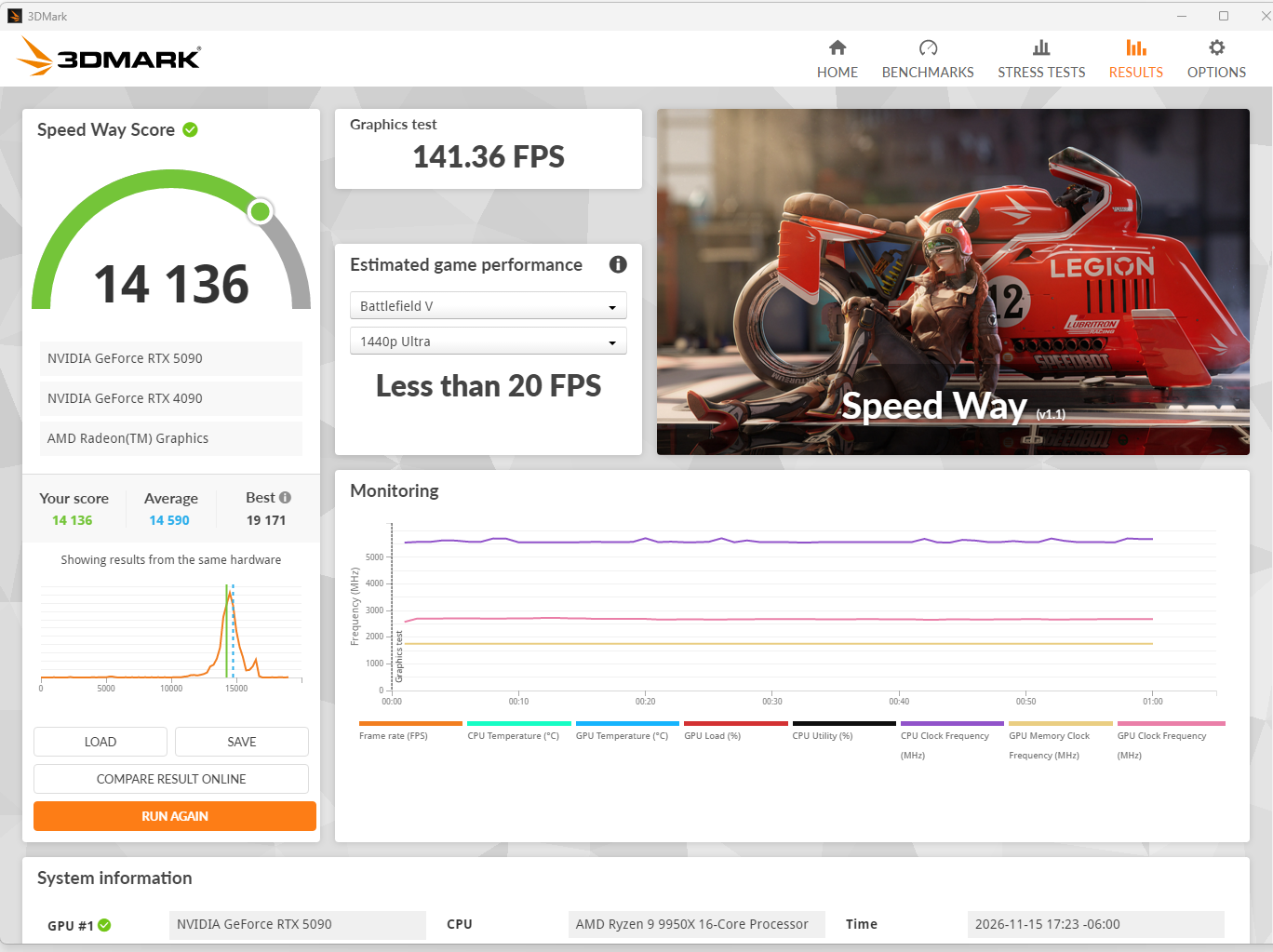
My RTX 5090 scored 14,136 points in 3DMark Speed Way in OC Mode, just slightly below the RTX 5090 average of 14,590 points. Considering that my RTX 5090 and RTX 4090 share 16 PCIe lanes (running at x8/x8), I’m more than happy with that result! The 20-loop stress test also passed with 98.9% frame-rate stability, which is an excellent result.
But what I really wanted to know was how much faster my actual DAZ Studio renders would be.
I rendered the exact same scene with identical settings on different GPU configurations:
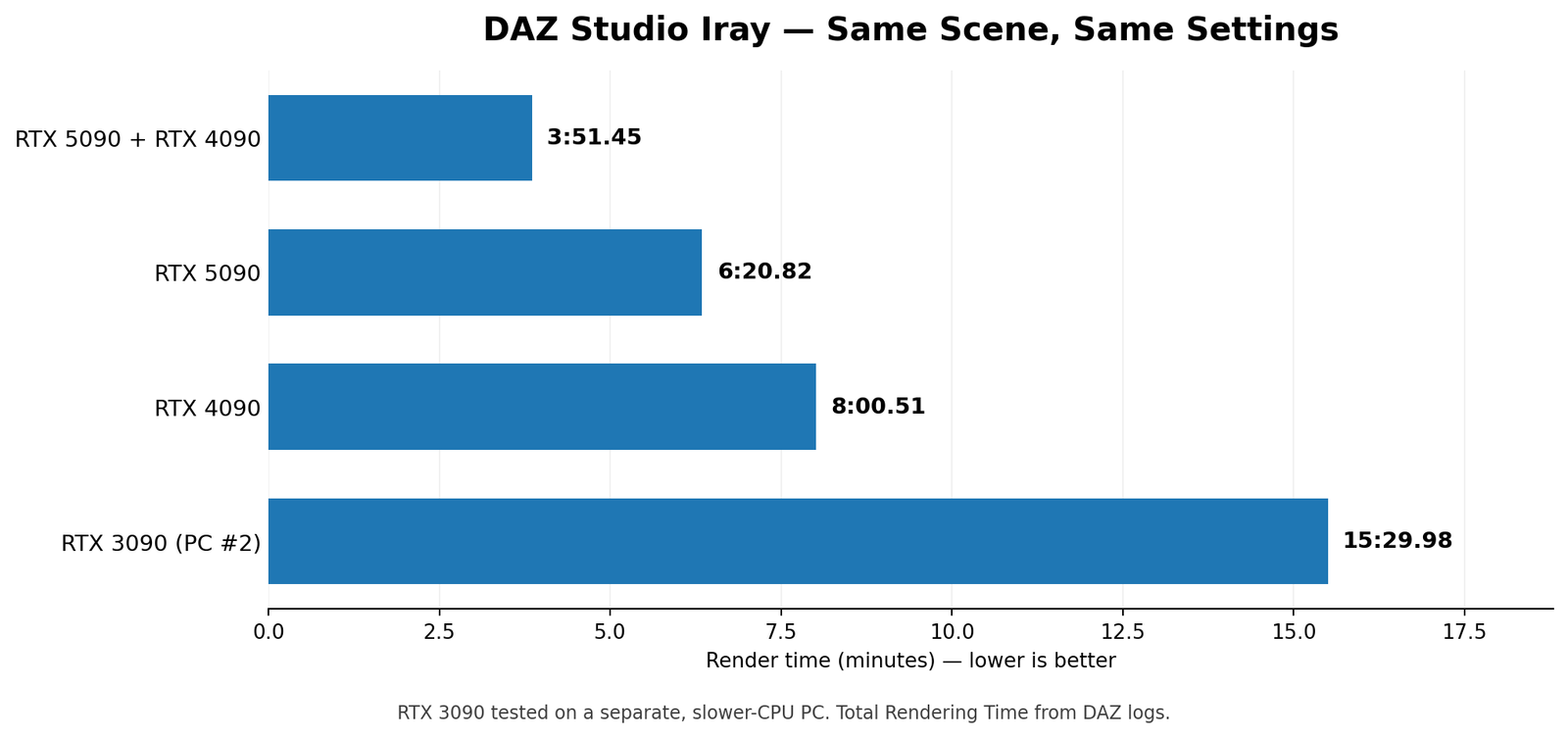
That’s more than 4 times faster than my RTX 3090, and using both GPUs together cuts rendering time by almost 40% compared to the RTX 5090 alone!
And if we compare my main workstation before and after the upgrade, rendering is now more than twice as fast! What used to take 8 minutes now takes less than 4!
But there’s more!
I also tested running two independent renders of the same scene simultaneously, using two versions of DAZ Studio: DAZ Studio 6 on the RTX 5090 and DAZ Studio 4 on the RTX 4090.
The results were interesting:
RTX 5090 (DAZ 6): 6:22.36
RTX 4090 (DAZ 4): 7:37.12
Total time to complete both renders: 7:37.12
If I had rendered the same scene twice, sequentially, using both GPUs together in DAZ Studio 6, it would have taken 7:42.90.
So running two independent renders was almost 6 seconds faster.
Okay, that’s not exactly groundbreaking. It’s practically within the margin of error. 🙂
BUT! There’s something important these numbers don’t account for.
Loading scenes and preparing them for rendering can take several minutes per scene. Much of that work is handled by the CPU, while the GPUs are largely idle.
With two independent rendering processes, one GPU can continue rendering while the other DAZ Studio instance loads and prepares its next scene.
This means that in a real-world workflow, especially when processing dozens or hundreds of scenes, the performance advantage could be considerably greater than these initial numbers suggest.
Of course, that’s still a theory. I’ll need to run more tests to see how much difference it actually makes.
But it looks very promising for my future batch-rendering tools!
And finally…
THANK YOU, MY FRIENDS!
This upgrade was only possible because of your support. Seriously, without you, I probably couldn’t even afford the electricity bill for this monster!
Thank you for supporting me and my projects!
You guys are awesome!